The ultimate AirDrop alternative for Android

The Best Wireless File Server
In Your Pocket.

Transform your Android device into a robust HTTP & FTP server. Share, manage, and transfer files wirelessly over your local network at blazing speeds without internet.

100+

Global Downloads

4.9

Average App Rating

30+

5-Star Reviews

How to Transfer Files Wirelessly on Android

Transferring files between Android, PC, Mac, or iOS has never been easier. No cables, no clouds, just local network speed.

1

Connect to Local Network

Ensure both your Android device and the receiving device (laptop, tablet, iPhone) are connected to the exact same WiFi network. Alternatively, activate a mobile hotspot.

2

Start the Server

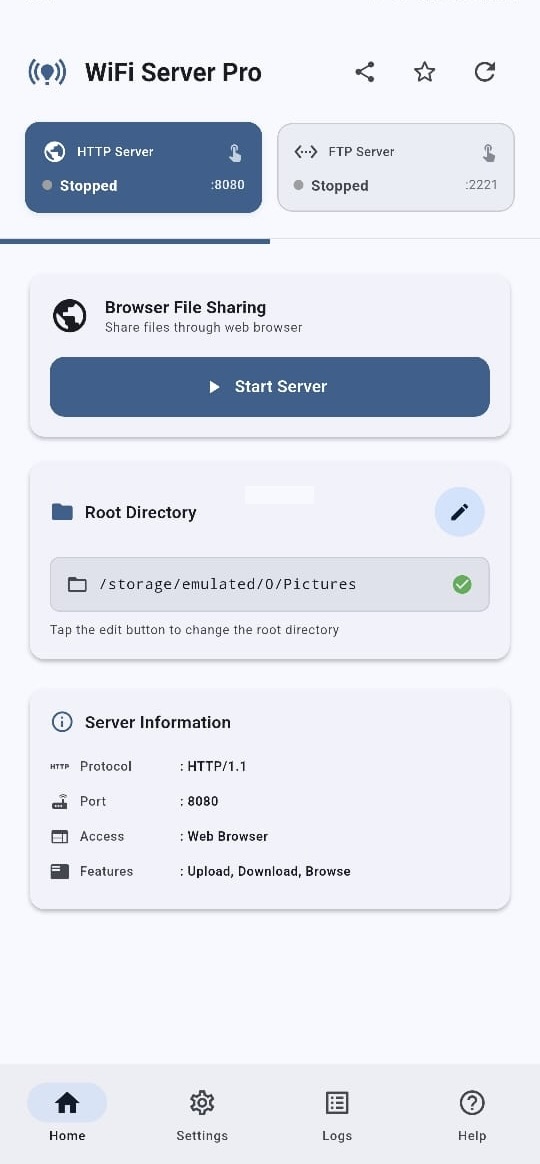
Open WiFi Server Pro and tap "Start Server". The app immediately provisions a secure local HTTP or FTP server directly on your device hardware.

3

Access Your Files

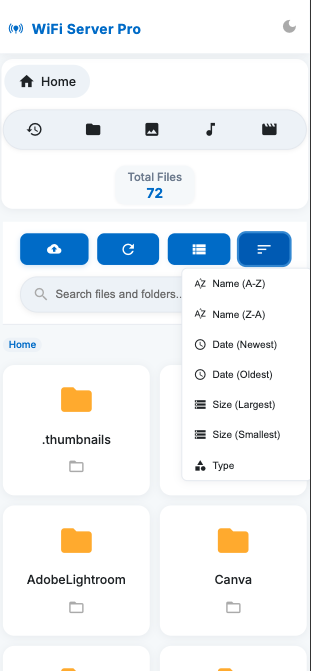
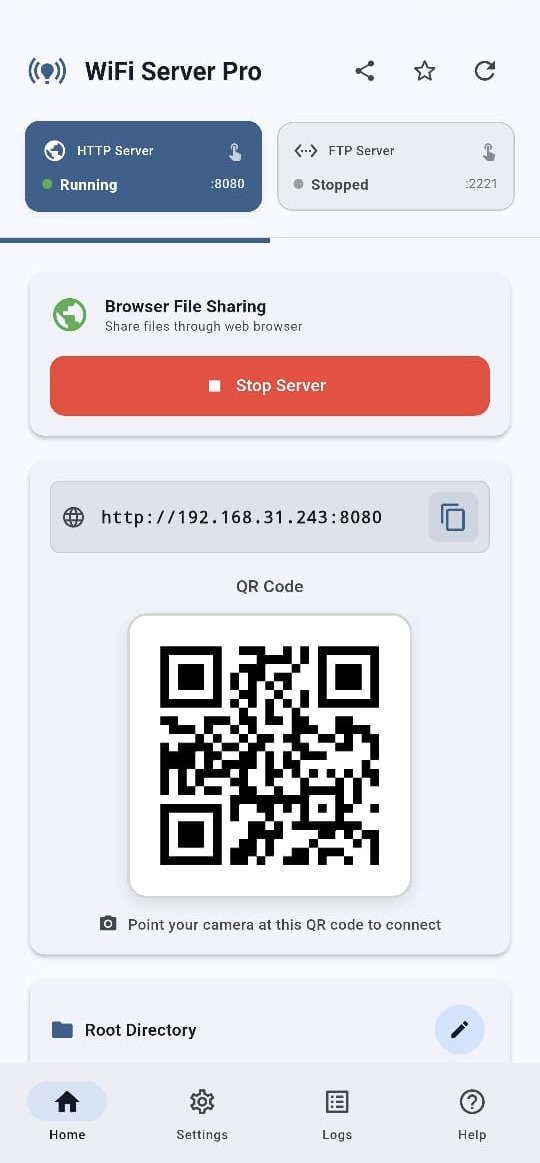
Simply scan the provided QR code, or type the generated IP address (e.g., http://192.168.x.x:8080) into any web browser to instantly access, upload, and download your files.

Beyond File Transfer

Real-time Messaging
& Clipboard Sync.

WiFi Server Pro isn't just a serverโ€”it's a local communication hub. Send messages and sync your clipboard across connected devices over your private network instantly.

  • Local WebSocket Chat: Communicate between devices with zero internet lag.
  • Smart Clipboard sharing: Copy on your phone, paste on your PC instantly.
  • No External Servers: Absolute privacy for your text and credentials.
WiFi Server Pro Messenger
โ— Connected (Local)
Hey! Can you send that 4K video file over?
Sure! It's transferring at 110MB/s right now.
Got it. Speed is amazing without cables!
Clipboard Synced Instantly

Local Network Architecture

A hybrid server implementation that provides triple-protocol communication over a zero-latency private tunnel.

Primary Node
Android Device Instance
HTTP/S FTP/S WebSocket
IEEE 802.11 (LAN)
Desktop Browser
Web-based Dashboard
FTP Client
FileZilla, Terminal
iOS / Tablet
Network Discovery

Enterprise Grade Security

Utilizing high-entropy authentication and local SSL/TLS encryption, your data is hardened against local network threats without requiring an external certificate authority.

WebSocket Communication

By spinning up a local WS server, we enable bi-directional data streams, powering our real-time chat and instantaneous clipboard synchronization features across all OS ecosystems.

Designed for the World

WiFi Server Pro is localized in 15+ major languages, making it the most accessible file server on the Play Store.

๐Ÿ‡บ๐Ÿ‡ธ English
๐Ÿ‡ฎ๐Ÿ‡ณ Hindi
๐Ÿ‡ช๐Ÿ‡ธ Spanish
๐Ÿ‡ซ๐Ÿ‡ท French
๐Ÿ‡ฉ๐Ÿ‡ช German
๐Ÿ‡ธ๐Ÿ‡ฆ Arabic
๐Ÿ‡จ๐Ÿ‡ณ Chinese
๐Ÿ‡ฏ๐Ÿ‡ต Japanese
๐Ÿ‡ฐ๐Ÿ‡ท Korean
๐Ÿ‡ง๐Ÿ‡ท Portuguese
๐Ÿ‡ท๐Ÿ‡บ Russian
๐Ÿ‡ฎ๐Ÿ‡ฉ Indonesian
๐Ÿ‡น๐Ÿ‡ท Turkish
๐Ÿ‡ฎ๐Ÿ‡น Italian
๐Ÿ‡ง๐Ÿ‡ฉ Bengali

Trusted by Power Users

See why thousands of professionals rely on WiFi Server Pro for secure, unthrottled local network transfers.

"Blazing fast local transfers."

Finally an app that doesn't route my local files through a random server on the internet. I'm hitting over 100MB/s moving huge video edits directly from my phone to my Mac.

DT
David T.
Google Play Review

"Zero ads and beautifully simple."

This completely replaced my old buggy FTP apps. The interface is clean, the HTTP server works instantly, and I don't have to deal with annoying subscriptions to transfer my own files.

AM
Alex M.
Verified User

"Perfect for privacy."

I needed an app that wouldn't harvest my data. The fact that this works offline via mobile hotspot is an absolute game changer. The QR code login makes desktop pairing frictionless.

SR
Sarah R.
Google Play Review
Get it on Google Play

Join thousands of users enjoying secure file transfers.

Frequently Asked Questions

Does it work without an internet connection?
Yes. WiFi Server Pro leverages TCP/IP protocols over your local Intranet. As long as devices are connected to the same router (or mobile hotspot), no external internet bandwidth is consumed.
Is there a limit on file sizes?
There are zero artificial caps. The system supports multi-gigabyte ISOs and 4K video distributions natively. Your only constraint is your device's physical storage limit.
Which devices can interface with the server?
The system is universally agnostic. It exposes a standard HTTP web page and FTP protocol. You can connect Mac, Windows, Linux, iOS, and other Android systems seamlessly via standard browsers or clients (like FileZilla).
Are the transferred files secure from interception?
Because the app routes data locally, it mitigates external man-in-the-middle risks. Additionally, you can secure the server instances with strict username and password authentication before any directory tree is exposed.